
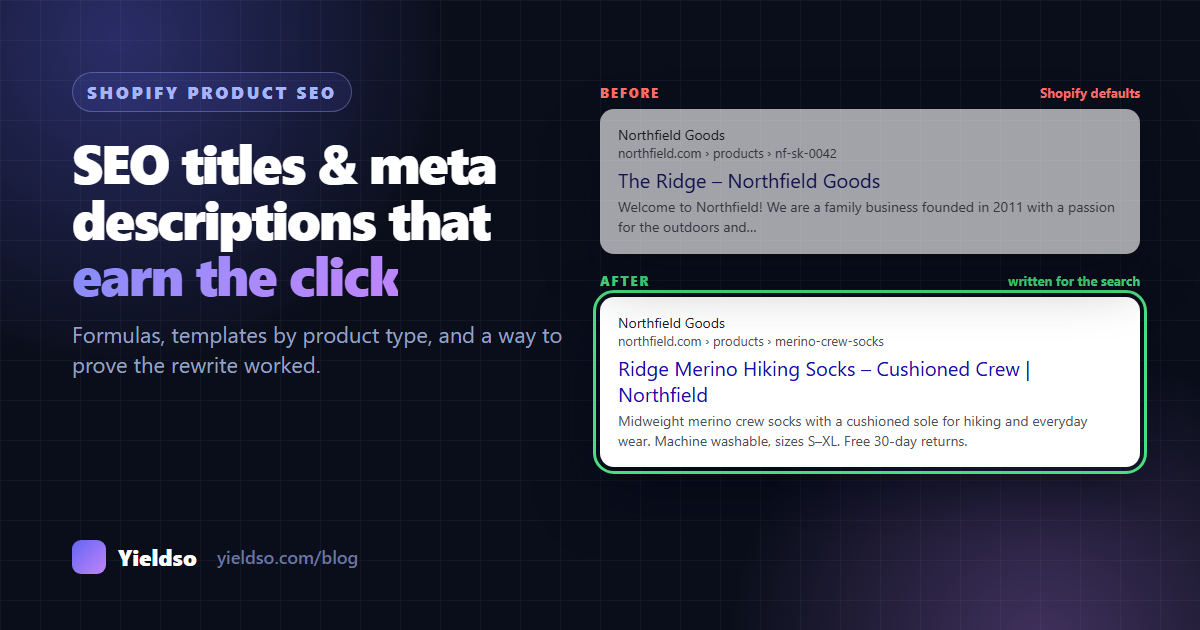
A good Shopify SEO title puts the words people search for first and stays under about 60 characters: [Product name] + [key attribute] + [product type] | [Brand]. A good meta description is about 140–160 characters and answers three things: what it is and who it's for, one or two concrete reasons to choose it, and a reason to buy from you. Start with products that already get impressions but few clicks, edit them under Search engine listing in each product, and compare clicks at the same position before and after.
Your title and meta description are the only part of your store a shopper sees before deciding whether to visit. Ranking gets you onto the results page. The title and description decide whether anyone clicks.
The good news is that this is one of the fastest SEO improvements you can make. You don't have to wait months for rankings to move. If a product already appears in Google but few people click on it, a better title and description can make a difference within weeks of Google picking up the change.
This guide covers what Shopify does when you leave these fields empty, two formulas that work for most products, ready-to-adapt templates by product type, how to do it across a whole catalogue, and how to tell whether it worked.
What Shopify does by default
Every product, collection, page and blog post in Shopify has a Search engine listing section at the bottom of its edit screen, with three fields: Page title, Meta description and URL handle. Click Edit (the pencil icon) to open them. Shopify shows a character counter and a preview as you type.
If you leave the fields empty, Shopify fills the gap:
- The title falls back to the product title. Many themes, including Shopify's own Dawn, then add your store name at the end, unless it's already in the title. So a product called "The Ridge" becomes "The Ridge – Northfield Goods", which doesn't tell a searcher what the product is.
- The meta description falls back to the start of the product description. If your description opens with a shipping notice, a brand story or "Welcome to our store!", that's what appears in Google.
Google doesn't always use what you write, either. It may show a different title (often taken from your page's main heading) or build a description from text on the page that better matches the search. You can't fully control this, but well-written fields that match the page get used far more often than vague or keyword-stuffed ones.
Step 1: Pick the products worth rewriting first
If you have hundreds of products, don't start at A. Start where a better listing will bring clicks soonest: pages that Google already shows, but that people pass over.
- In Google Search Console, open Performance → Search results and switch on Average CTR and Average position.
- Click the Pages tab and filter to URLs containing
/products/. - Sort by Impressions. Look for pages with plenty of impressions, a position between about 3 and 15, and a CTR that's low for that position.
- Click one of those pages, then the Queries tab. These are the exact words people searched when your product appeared, and they're the raw material for your new title.
Not sure what CTR is "low" for a position? The CTR Opportunity Calculator compares your numbers with typical click rates by position and shows the likely gain as a range.
Make a list of 10–20 products to begin with. Your best sellers belong on it too, even if their CTR looks fine. A small improvement on a product that already sells well is worth a lot.
Step 2: Write the SEO title
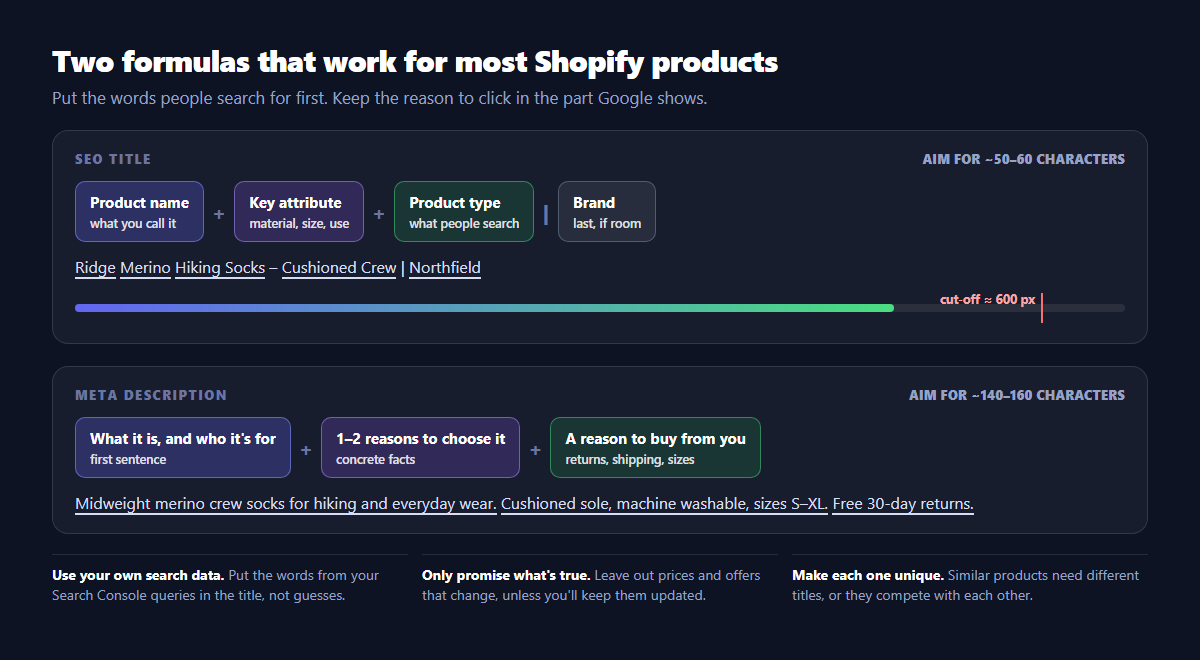
The formula that works for most products:
[Product name] + [Key attribute] + [Product type] | [Brand]
Eight rules that make the difference:
- Lead with the words people search for. Use the product type and the attribute shoppers care about ("merino hiking socks", "linen duvet cover", "vegan leather wallet"). Take them from your Search Console queries, not from guesses.
- Keep it to roughly 50–60 characters. Google cuts titles at around 600 pixels wide, so wide letters run out sooner. Check it with the SERP Snippet Preview.
- Add the one attribute that sets this product apart: material, size, capacity, compatibility, the use it's made for. If you sell five similar products, this is what tells them apart.
- Put the brand last, or leave it out when space is tight. Unless your brand is well known, the product is what people search for. In themes that add the store name automatically, including it yourself stops it being added twice.
- One phrase per idea. "Hiking Socks, Walking Socks, Trail Socks" reads as spam to shoppers and to Google. Pick the main phrase and let the description cover the variations.
- Make every title unique. Two products with the same title compete with each other, and Google has to guess which one to show.
- Keep it consistent with the page. If the title promises "waterproof" and the page doesn't mention it, Google is more likely to rewrite the title, and shoppers who click will leave.
- No ALL CAPS, emoji or "!!!". Google often removes them, and they make a listing look less trustworthy.
Step 3: Write the meta description
The meta description doesn't affect where you rank. Google has said so for years. It affects whether people click. Treat it as a short ad for the product.
[What it is, and who it's for] + [1–2 reasons to choose it] + [A reason to buy from you]
- Aim for about 140–160 characters. Mobile results often show less, so put the most important part first.
- Use concrete facts rather than adjectives: "machine washable, sizes S–XL" beats "premium quality you'll love".
- Give a reason to buy from you: free returns, fast dispatch, a guarantee, a size range, made locally. Only include what's true on the product page.
- Be careful with prices and offers. A price or "20% off" in the description goes out of date the moment it changes. Leave it out unless you'll keep it updated. Google can show your live price from structured data anyway.
- Include the main search phrase naturally. Google often highlights the words that match the search, which draws the eye.
- Make each one unique. A shared, store-wide description is barely better than an empty one.
Draft both fields at once with the Meta Tag Generator, then check how they'll look on desktop and mobile in the SERP Snippet Preview.
Templates by product type
Use these as starting points. Swap in your own product's facts, and check each result against the rules above. The examples use made-up products.
| Product type | SEO title template and example | Meta description example |
|---|---|---|
| Clothing | [Name] [Material] [Garment] – [Fit/Use] | [Brand] Aspen Linen Shirt for Men – Relaxed Fit | Fieldwear |
Breathable 100% linen shirt with a relaxed fit for warm days. Pre-washed for softness, sizes XS–XXL. Free exchanges on sizing. |
| Shoes | [Name] [Type] – [Key feature] | [Brand] Tempo Running Shoes – Lightweight, Wide Fit | Stride |
Lightweight road running shoes with a roomy toe box for wide feet. Cushioned for daily miles, half sizes 5–13. 60-day trial. |
| Beauty and skincare | [Name] [Product] for [Skin type/concern] | [Brand] Calm Gel Moisturiser for Oily Skin | Leaf & Co |
Lightweight gel moisturiser for oily and combination skin, with niacinamide and no added fragrance. 50 ml. Vegan and cruelty-free. |
| Home and furniture | [Name] [Material] [Item] – [Size/Style] | [Brand] Oslo Oak Coffee Table – Round, 80 cm | Hearth |
Solid oak round coffee table, 80 cm across, with a hand-oiled finish. Arrives assembled. Free delivery and 2-year guarantee. |
| Electronics and accessories | [Product] for [Compatible device] – [Key spec] | [Brand] Slim Case for iPhone 16 – MagSafe Compatible | Shell |
Slim protective case for iPhone 16 with built-in magnets for MagSafe chargers. Raised camera edge, drop-tested. Ships next day. |
| Food and drink | [Name] [Product] – [Origin/Flavour], [Size] | [Brand] Huila Single-Origin Coffee Beans – Chocolate Notes, 250 g | Roastery |
Medium-roast Colombian coffee beans with notes of chocolate and red apple. Roasted to order, whole bean or ground. Free UK shipping over £30. |
| Jewellery | [Name] [Metal] [Item] – [Stone/Style] | [Brand] Luna Sterling Silver Necklace – Moonstone Pendant | Arlo |
Sterling silver necklace with a hand-set moonstone pendant on an adjustable 40–45 cm chain. Gift-boxed, with free engraving. |
| Gifts and bundles | [Occasion/Recipient] [Product] – [What's inside] | [Brand] Coffee Lover's Gift Box – Beans, Mug & Filter | Roastery |
A ready-to-give coffee gift box with two 250 g bags of beans, a stoneware mug and a pour-over filter. Gift note included. |
Collections, your home page and blog posts
Products aren't the only pages that need this. Collection pages often target broader, higher-volume searches than any single product.
- Collections (Products → Collections → [collection] → Search engine listing): title formula [Category] for [Use/Audience] – [Differentiator] | [Brand], e.g. "Merino Hiking Socks for Men & Women | Northfield". Description: what's in the range, how to choose, and your store promise.
- Home page (Online Store → Preferences → Title and meta description): say what you sell, not just your name. "Northfield – Merino Socks & Base Layers for Hiking" beats "Northfield – Home".
- Blog posts (in each post's Search engine listing): write the title as the question or task the reader has, e.g. "How to Choose Hiking Socks: Materials, Thickness and Fit". Use the description to promise the answer.
Doing it across a whole catalogue
Writing by hand works for your top 20 products. For the rest, you have two options in Shopify itself:
- The bulk editor. In Products, select the products, click Bulk edit and add the SEO title and SEO description columns. It's good for editing 20–50 at a time while seeing them side by side.
- CSV export and import. Export products, edit the
SEO TitleandSEO Descriptioncolumns in a spreadsheet, and re-import. Keep the original export, unchanged, so you can undo mistakes, and re-import only the rows you changed.
A spreadsheet trick for patterns: add columns for name, attribute and type, then build the title with a formula, e.g. =A2&" "&B2&" "&C2&" | Northfield", and a length check with =LEN(D2). A pattern-based title is far better than an empty one. Still hand-write the products that matter most, because a pattern can't know what makes each one worth clicking.
Work in batches. Change 20–50 products at a time and note the date for each batch. If you change 800 products on one day and clicks go up or down, you won't know why.
Step 4: Prove it worked
Most people skip this, then can't tell whether the work paid off. It takes ten minutes per batch.
- Record the date you changed each product, and keep the old title and description.
- Ask Google to re-crawl your most important pages: paste the URL into Search Console's URL Inspection and click Request indexing.
- Check the live result a few days later by searching for the product. Is Google showing your new title? If it's showing something else, see the FAQ below.
- Wait 3–4 weeks, then compare the same number of days before and after the change for that page in Search Console (use Compare in the date filter, and keep the weekdays aligned).
- Compare CTR at a similar position. If the page also moved from position 9 to position 4, its CTR would rise anyway. A fair test is: at roughly the same average position, did more of the people who saw it click?
- Check a page you didn't change. If clicks rose by the same amount on untouched products, it was probably the season, not the rewrite.
Common mistakes
- Leaving the fields empty and hoping the product title and description work. They rarely do.
- One description for every product. It's almost as bad as none, and Google tends to ignore it.
- Stuffing every keyword into the title. Shoppers skip spammy results, and Google is more likely to rewrite them.
- Promising what the page doesn't deliver: free shipping that has a minimum, "waterproof" when it's water-resistant. You'll get the click and lose the sale.
- Changing the URL handle while you're there. Titles and descriptions can change freely. The handle changes the URL, so only change it with the redirect box ticked.
- Never checking the result. Without a before and after, you can't tell a good rewrite from a bad one.
FAQ
Does the meta description affect my rankings?
No. Google has said meta descriptions aren't used for ranking. They matter because they affect whether people click, and a result that earns clicks sends you traffic from the ranking you already have.
Why is Google showing a different title from the one I wrote?
Google rewrites titles it thinks don't describe the page well. The usual reasons are: the title is very long, repeats keywords, doesn't match the page's main heading, or is the same as other pages on your store. Make the title shorter, specific and consistent with the product name on the page. Google usually goes back to using it once it re-crawls the page.
Should I put the price in the title or description?
Usually not. Prices change, and an out-of-date price in a search result causes disappointment at checkout. If your products have valid structured data, Google can show your current price and stock in the result anyway.
How long until I see a difference?
Google has to re-crawl the page first. That can take days for popular pages and weeks for others (Request indexing helps). Allow 3–4 weeks of data after the change before judging, and longer for low-traffic products.
Yieldso flags products whose titles and descriptions are missing, too short or too long (and its site audit catches duplicates across pages), then drafts replacements for you to review. On the free plan the drafts follow templates. On Growth and Pro, AI writes them from each product's own facts and the searches it actually appears for, in your brand voice, and checks every claim against your product data before you see it. You can approve one product or a whole product type, vendor or tag at once. Every change can be undone in one click, and with Search Console connected, each one gets a before-and-after result. Try the free SERP Snippet Preview first, or install the app to see which of your products to start with.