
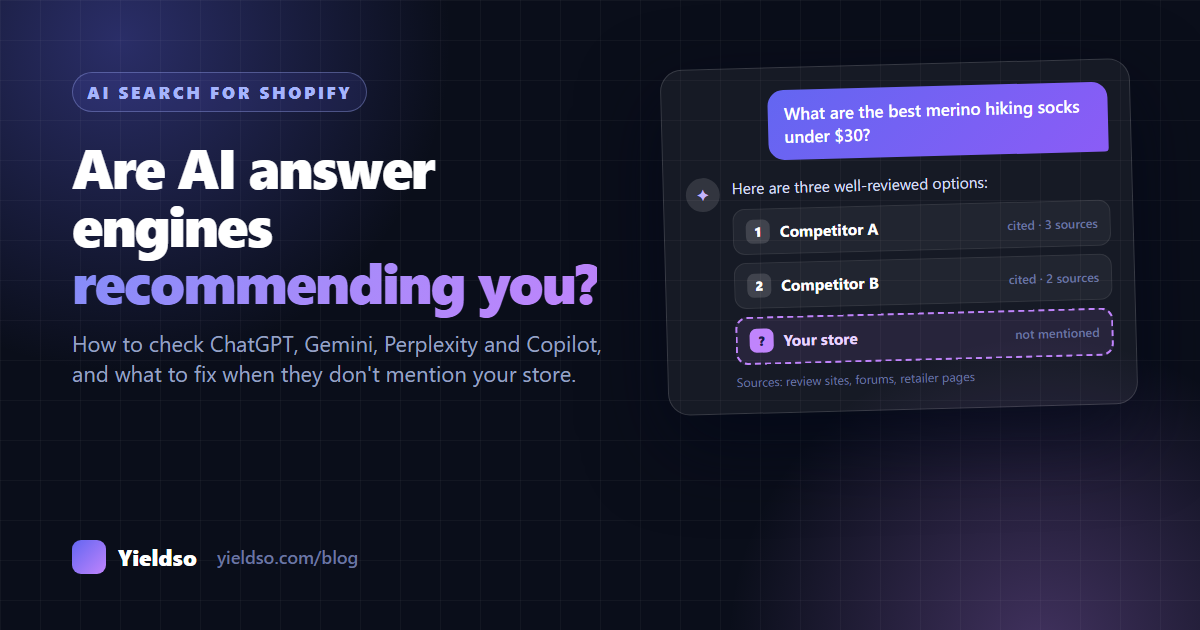
To find out whether AI assistants recommend your store, ask them the questions your shoppers ask. Use 15–20 real buying prompts, run them logged out in ChatGPT, Gemini/Google AI Mode, Perplexity and Copilot, and record who gets mentioned and which sources are cited. If you're missing, the cause is almost always one of six things: AI crawlers are blocked, you're not indexed in Bing, key product facts are missing from your pages, you have no product feed, too few other sites mention you, or your content doesn't match how people ask. Each has a practical fix, covered below.
A shopper looking for hiking socks used to type "merino hiking socks" into Google and scroll through ten links. Now many of them ask ChatGPT, Gemini, Perplexity or Copilot something like "What are the best merino hiking socks under $30 that don't get smelly?" and get a short answer naming two or three products.
If your store isn't one of them, you don't lose a ranking position. You simply aren't part of the conversation, and you won't see it in any report.
The good news is that you can check where you stand with nothing more than a spreadsheet and an afternoon, and most of the fixes build on SEO work that helps you in Google anyway. This guide shows you how.
How AI assistants decide which products to mention
An AI assistant can't recommend a product it has never "seen". Product information reaches it through three main routes:
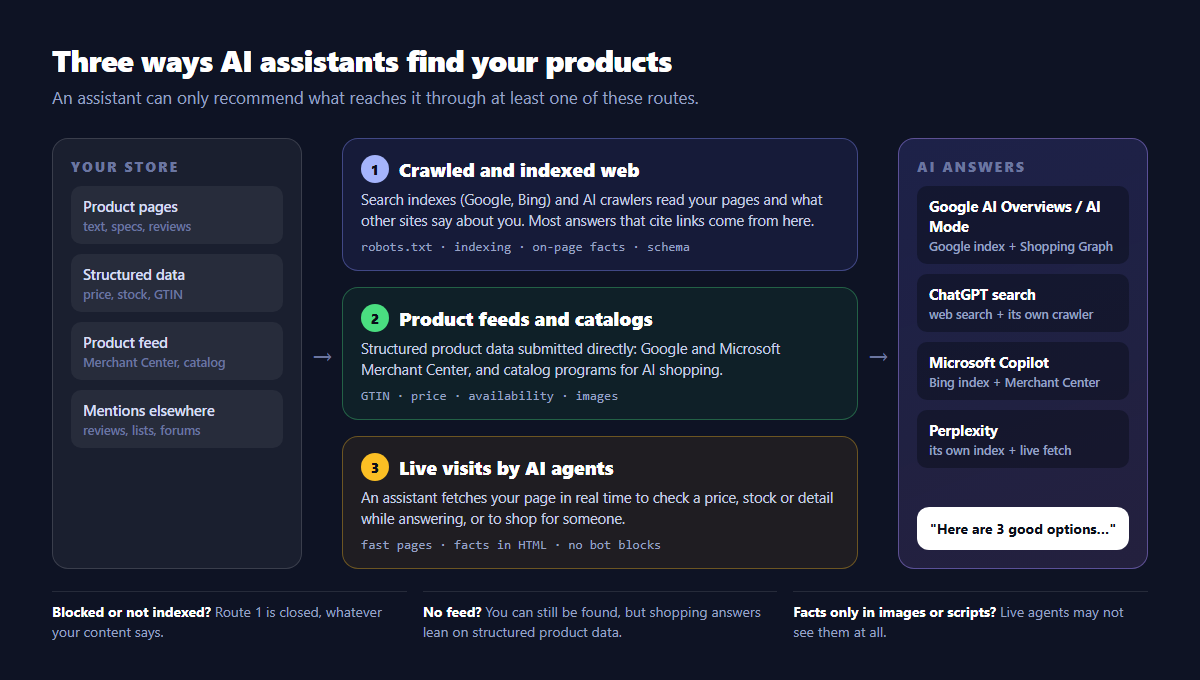
- The crawled and indexed web. Search engines (Google, Bing) and the AI companies' own crawlers read your pages and what other websites say about you: reviews, round-up articles, forum threads. When an assistant searches the web to answer a question, it draws on these indexes. Most answers that include links come from here.
- Product feeds and catalogs. Structured product data you submit directly, such as Google Merchant Center and Microsoft Merchant Center, and the catalog programs AI shopping features use. This is where exact prices, stock levels, images and product identifiers come from.
- Live visits by AI agents. Increasingly, an assistant fetches a page in real time while answering, to check a price or a detail, or to carry out a shopping task for someone. Whatever it can read on your page at that moment is what it uses.
Each assistant leans on these routes differently:
| Assistant | Where its product information mainly comes from | What you control |
|---|---|---|
| Google AI Overviews and AI Mode | Google's search index, plus the Shopping Graph (which includes Merchant Center data) for shopping questions | Indexing in Search Console, on-page content, structured data, a Merchant Center feed |
| ChatGPT (search and shopping) | Web search through third-party providers and OpenAI's own crawler (OAI-SearchBot), plus structured product data for shopping results | Allowing OAI-SearchBot, being indexed in Bing, structured data, product feeds where available |
| Microsoft Copilot | Bing's index and Microsoft Merchant Center | Bing Webmaster Tools, a Microsoft Merchant Center feed |
| Perplexity | Its own index (PerplexityBot) and live page fetches | Allowing its crawlers, facts written in the page text |
| Claude | Web search and page fetches (Claude-SearchBot, Claude-User) | Allowing its crawlers, facts written in the page text |
These systems change often, so treat the table as a starting point. Two patterns hold across all of them. Bing matters far more than its search market share suggests, because several assistants rely on it. And assistants trust what other sites say about you at least as much as what you say about yourself.
Step 1: Run a 30-minute AI visibility audit
You don't need a paid tool to find out whether assistants mention you. You need a consistent set of questions and a consistent way of asking them.
1. Write 15–20 prompts your shoppers would actually ask
Mix five types of question. Write them in natural language, the way a person talks to an assistant, not in search-keyword style.
| Prompt type | What it tests | Example |
|---|---|---|
| Category | Whether you're named among the best options | "What are the best merino hiking socks under $30?" |
| Problem | Whether you're linked to the need your product solves | "My feet get sweaty on long hikes. What socks should I buy?" |
| Attribute | Whether your specific strengths are known | "Merino socks made in Europe with a lifetime guarantee" |
| Comparison | How you're described next to competitors | "Northfield vs [competitor]: which hiking socks are better?" |
| Brand | Whether the facts about you are accurate | "Is Northfield a good brand? What's their return policy?" |
Where to find real prompts: your Search Console queries (especially longer ones starting with best, which, how, what), questions from customer emails and chat, the "People also ask" box in Google, and the words customers use in reviews. Aim for roughly 8 category/problem prompts, 4 attribute, 4 comparison and 3 brand.
2. Ask in a way that gives fair results
AI answers vary from person to person and from one attempt to the next. To get results you can compare month to month:
- Log out, or use a private or temporary chat. Assistants personalise answers using your history. As the store owner, you've probably talked to them about your own brand, and that skews the results.
- Turn on web search where it's optional, so you see the version of the answer that cites sources.
- Ask each prompt two or three times in fresh chats. If you appear once in three attempts, record it as "sometimes".
- Test the assistants your customers use. At minimum: ChatGPT, Google (AI Mode or AI Overviews), Perplexity and Copilot.
- Write down the date. You'll repeat this exact audit every month.
3. Record the results in a scorecard
Make a spreadsheet with one row per prompt per assistant and these columns:
| Column | What to write |
|---|---|
| Prompt | The exact wording |
| Assistant | ChatGPT / Google AI Mode / Perplexity / Copilot |
| Mentioned? | Yes / Sometimes / No |
| Linked? | Did the answer link to your site? |
| Position | 1st, 2nd, 3rd… in the list of recommendations |
| Competitors named | Who was recommended instead of you (or alongside you) |
| Sources cited | The websites the answer linked to or quoted |
| Accurate? | For brand prompts: were your prices, policies and product details right? |
4. Read the results
Three numbers tell you most of what you need:
- Mention rate: the percentage of category and problem prompts where you appear at least sometimes. This is your headline number to track.
- Share of answers: how often you're named compared with each competitor across all prompts. It shows who "owns" your category in AI answers.
- Accuracy: the number of brand prompts with a wrong fact. A wrong return policy or an old price is a problem even if you're mentioned.
Step 2: Check what your analytics already shows
The audit shows whether you're mentioned. Your analytics show whether those mentions turn into visits and sales.
In Shopify
Go to Analytics → Reports and open the sessions report broken down by referrer (the exact report names vary a little by plan). Look for these referring sites:
chatgpt.com(ChatGPT also addsutm_source=chatgpt.comto many of the links it shows)perplexity.aigemini.google.comcopilot.microsoft.comandbing.com(Copilot visits sometimes arrive as Bing)claude.ai
In Google Analytics 4
Create an exploration with Session source as the dimension and filter it with a regular expression such as chatgpt|perplexity|gemini|copilot|claude. Add Landing page and Purchases to see which products AI visitors arrive on and whether they buy.
In Search Console
Clicks and impressions from Google's AI Overviews and AI Mode are included in your normal Performance → Search results data (web search type), not in a separate report. You can't split them out directly, but watch for queries whose impressions rise while clicks stay flat. That's often a sign an AI Overview is answering the question on the results page.
What to look for: numbers will likely be small. What matters is the trend, which pages AI visitors land on (these are the pages assistants already trust), and how they convert compared with your other traffic.
Step 3: Find out why you're missing (six common causes)
If your audit shows you're rarely mentioned, work through these causes in order. The first two block you completely, so check them first.
1 AI crawlers can't reach your store
How to check: open yourstore.com/robots.txt and look for Disallow rules under user agents such as GPTBot, OAI-SearchBot, ClaudeBot, PerplexityBot or a catch-all User-agent: *. Shopify's default robots.txt doesn't block these crawlers, but a customised robots.txt.liquid file, a bot-protection app or a CDN/firewall rule (if you run your domain through one) can.
How to fix: decide deliberately which crawlers to allow. It helps to know there are two kinds. Training crawlers (like GPTBot) collect content to train models. Search and answer crawlers (like OAI-SearchBot, PerplexityBot, Claude-SearchBot) fetch pages so the assistant can cite them in answers. You can block training and still allow answers. Blocking the answer crawlers means you can't be cited.
Check all the major AI crawlers in one go with the free AI Crawler Checker.
2 You're not properly indexed in Bing
Why it matters: several assistants, including Copilot, use Bing's index when they search the web. Many Shopify merchants set up Google Search Console and never touch Bing.
How to check: search site:yourstore.com on Bing and compare the number of results with the number of products and pages you have. Also search for a few of your products by name.
How to fix: sign up for Bing Webmaster Tools. You can import your site straight from Google Search Console in a couple of clicks. Submit your sitemap (yourstore.com/sitemap.xml) and check the Site Explorer and URL Inspection reports for pages Bing hasn't indexed.
3 The facts assistants need aren't on your pages
Why it matters: an assistant answering "which socks are best for sweaty feet under $30" needs to find, in text, that your socks are merino, that merino wicks moisture, and that they cost $24. If the material is only on an image, the use case isn't stated anywhere, and the price loads in a script, the assistant has nothing to go on.
How to fix:
- Put 3–5 key facts in plain text near the top of every product page: material, size, what it's best for, the thing people ask most.
- Add a specifications table and a short FAQ answering real shopper questions.
- Write specific, quotable sentences. "Fits laptops up to 13 inches and weighs 480 g" gets used. "The ultimate companion for your lifestyle" doesn't.
- Make sure your product structured data (price, availability, brand, GTIN, reviews) is valid and matches the page.
Our Shopify Product SEO Checklist walks through all of this, product by product, with the exact places to click in Shopify.
See how a product page scores on these points: try the Shopify Product Grader.
4 You don't have a product feed
Why it matters: for shopping questions, assistants lean heavily on structured product data: exact price, availability, variants, images and identifiers. Feeds are the most reliable way to provide it, and they update as your stock and prices change.
How to fix:
- Google: install Shopify's free Google & YouTube app and connect Merchant Center. Free product listings are available without running ads, and this data feeds Google's shopping results.
- Microsoft: set up Microsoft Merchant Center (there's a Shopify channel app for it). This covers Bing shopping and is used by Copilot.
- AI shopping programs: Shopify and the AI companies are adding ways to make catalogues available to AI shopping assistants directly. Check your Shopify admin's sales channels and settings for what's available on your plan and in your region.
- Whatever feed you use, fill in GTINs (barcodes) on every variant where your products have them, plus brand and accurate product categories.
5 Too few other sites mention you
Why it matters: when an assistant recommends "the best hiking socks", it usually summarises what independent sources say: review sites, "best of" articles, forum discussions, YouTube reviews. A brand that only describes itself on its own site is easy to overlook.
How to fix (honestly):
- Start with the sources in your audit. Look at the round-ups and review sites assistants cited for your competitors. Contact the authors with a sample, and correct any outdated information about your brand.
- Collect reviews on your own product pages and, where relevant, on independent review platforms.
- Take part in communities where your customers ask questions (subreddits, forums, Facebook groups). Answer helpfully, disclose that you run the store, and don't spam links. Communities remove promotional posts, and assistants increasingly quote genuine discussions.
- Get listed where your category is compared: niche directories, "made in" lists, sustainability or certification databases, and marketplaces if they suit your business.
6 Your content doesn't match how people ask
Why it matters: people ask assistants long, specific questions like "best", "for", "vs", "without", "under $X". If your site only has product pages, there's nothing that directly answers a question such as "merino vs synthetic socks for hiking".
How to fix:
- Buying guides for your main categories ("How to choose hiking socks: materials, thickness and fit").
- "Best for" collection pages with a short, genuinely useful intro ("Socks for hot-weather hiking").
- Honest comparison content: your product types against the alternatives, and where fair, against well-known competitors. Assistants reward balanced comparisons more than one-sided sales copy.
- An FAQ built from real customer questions, with direct answers in the first sentence.
+ Bonus: the information about you is inconsistent
If your prices, return policy or product details differ between your site, your feeds, marketplaces and old press articles, assistants may repeat the wrong version, or avoid recommending you because the sources disagree. Keep one source of truth (your Shopify product data), let your feeds sync from it, and update old listings when policies change. Use the brand prompts from your audit to spot errors.
Step 4: A six-week fix plan
| Week | Focus | Tasks |
|---|---|---|
| 1 | Baseline and access | Run the audit and save the scorecard. Check AI crawler access in robots.txt and any bot-protection settings. Set up Bing Webmaster Tools and submit your sitemap. |
| 2 | Feeds | Connect Google Merchant Center (Google & YouTube app) and Microsoft Merchant Center. Fill in missing GTINs, brands and categories. |
| 3 | Top product pages | For your 10 most important products: key facts in text, specs table, FAQ, valid structured data. |
| 4 | Answer content | Publish one buying guide for your main category and add useful intros to your top collection pages. |
| 5 | Outside mentions | Contact the three most-cited sources from your audit. Set up post-purchase review requests. Correct outdated listings. |
| 6 | Measure | Re-run the same audit and compare mention rate, share of answers and accuracy. Check AI referral visits in analytics. Decide next month's focus. |
How quickly will it change? Fixing crawler access and indexing can make a difference within weeks, once pages are re-crawled. Changes that depend on other sites mentioning you, or on AI models picking up new information, take longer, often months. That's why a monthly audit with the same prompts matters more than checking every day.
What not to do
- Don't pay for "guaranteed ChatGPT placement". Nobody can guarantee what an assistant will recommend.
- Don't hide text for AI crawlers (white text, content shown only to bots). It's the same cloaking that search engines penalise, and it's easy to detect.
- Don't expect an
llms.txtfile to fix things. It's a proposed standard that some tools read, but it's no substitute for good pages, feeds and mentions. Shopify stores already serve one by default. - Don't block
Google-Extendedexpecting to leave AI Overviews. That setting controls whether Google may use your content for its Gemini models. It doesn't remove you from Google Search features, and blocking it won't get you into them either. - Don't fake reviews or seed fake forum posts. Communities and platforms remove them, and being caught does lasting damage to the brand you're trying to build.
- Don't neglect SEO. Being indexed, fast, clearly written and well linked is still the foundation of every route in the diagram above.
FAQ
Can I pay to be recommended by ChatGPT or other assistants?
Not in their regular answers. Some assistants are experimenting with clearly labelled ads, but these are kept separate from the answer itself. The recommendations in the answer are based on what the assistant finds and trusts, which is what this guide is about.
Is AI search going to replace Google for my store?
Not overnight. For most stores, Google search is still by far the largest source of organic traffic, and Google's own AI features are part of Google Search. The practical approach is to do the SEO basics well, because they feed AI answers too, and to add the AI-specific steps: crawler access, Bing, feeds and outside mentions.
How often should I re-run the audit?
Monthly is enough for most stores. Use exactly the same prompts so results are comparable, and add new prompts in a separate section rather than changing the originals.
Why do I get different answers every time I ask?
AI answers are generated fresh each time and depend on the wording, the searches the assistant runs, your location and your chat history. That's why the audit asks each prompt more than once, logged out, and records "sometimes" as well as yes and no. Over 20 prompts, the overall pattern is reliable even when individual answers vary.
Does being recommended by AI actually lead to sales?
It can, but measure it for your own store instead of assuming. Track AI referral sessions, the pages they land on, and their conversion rate in Shopify or GA4 (Step 2). For many stores the numbers start small, so look at the trend over several months.
Yieldso doesn't run these prompts for you, and it doesn't claim to know what an assistant will say. It checks the things that decide whether you can be recommended: whether AI crawlers can reach your pages, whether each product states its key facts, and whether your structured data is complete and valid. It then drafts fixes for you to approve, each with one-click undo, and shows the visits AI assistants send, which AI crawlers read your store, and the orders that follow. Start with the free AI Crawler Checker, or install the app to score your store.