
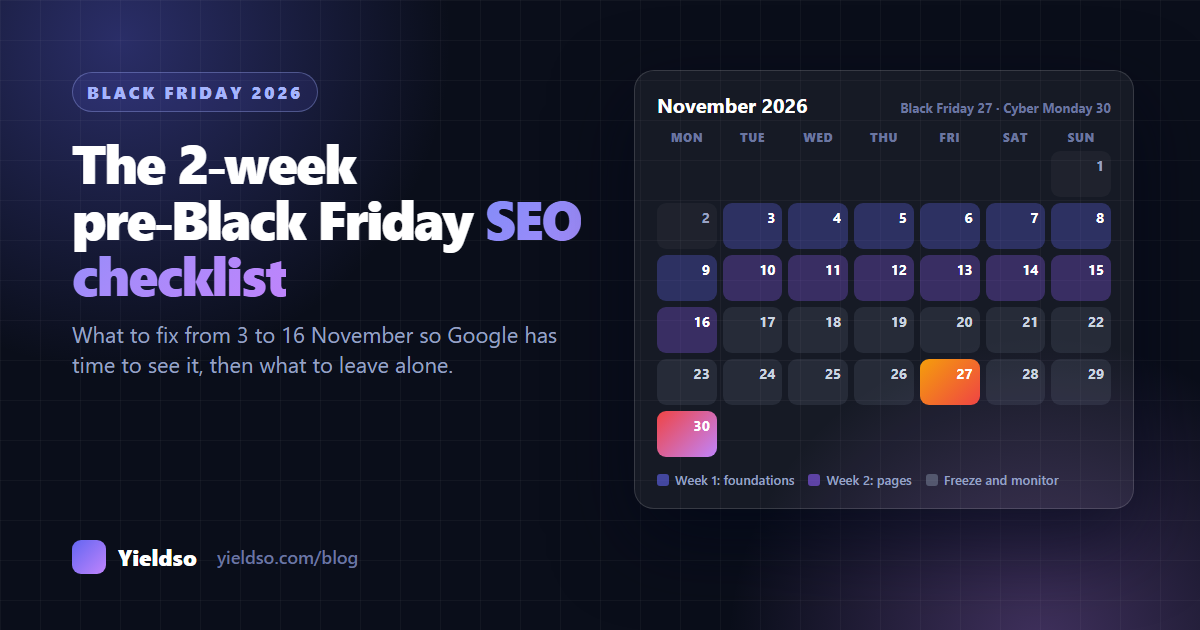
Black Friday is Friday 27 November 2026, and Google needs days to weeks to pick up changes. So do your SEO work between 3 and 16 November, then stop changing things. Week 1 covers foundations: Search Console and Bing, broken links, speed, structured data and baseline numbers. Week 2 covers pages: a Black Friday collection at a URL you'll reuse every year, gift guides, titles and descriptions for your best sellers, internal links, and clear shipping cut-offs. From 17 November, freeze theme and URL changes, set sale prices with Shopify's compare-at price, and keep sold-out products live.
Every November, many store owners spend Black Friday week rewriting product descriptions, launching a new sale page and installing a new app. Most of that work arrives too late to make a difference in search.
Search engines don't see changes the moment you make them. A new page has to be found, crawled and indexed, and that can take days for popular pages and weeks for others. Anything you publish on 25 November will barely have been seen by Google by the time the sale is over.
This checklist is built around that delay. It gives you two weeks of focused work, starting today, that finishes with ten days to spare. Then it tells you what to leave alone.
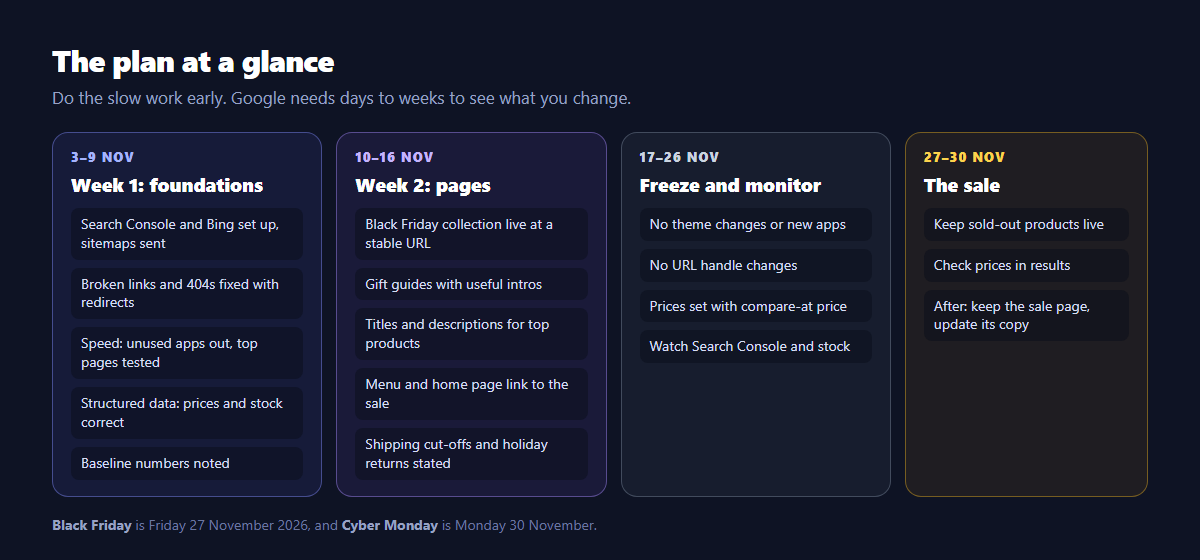
Week 1 (3–9 Nov): foundations
Start with the store-wide work. It takes the longest to show up and protects everything else.
1 Make sure search engines can see your store
- Confirm your store is verified in Google Search Console, and that your sitemap (
yourstore.com/sitemap.xml) has been submitted and read without errors. - Set up Bing Webmaster Tools too, which takes two minutes if you import from Search Console. Bing powers Copilot and is used by several AI assistants that shoppers ask for gift ideas.
- Check
yourstore.com/robots.txthasn't been changed to block search or AI crawlers. Our guide to what AI crawlers can see shows how.
2 Fix broken links and 404s
A year of discontinued products, renamed collections and old campaign links leaves broken links behind. Every one wastes a visit at the moment visits are most valuable.
- In Search Console, open Indexing → Pages and look at Not found (404).
- Check your menus, home page banners and last year's sale page for links to products that no longer exist.
- For each broken URL, add a 301 redirect to the closest live product or collection (search "URL redirects" in the Shopify admin), not to your home page.
Check that a redirect goes where you expect with the free Redirect Checker.
3 Speed up your most important pages
Shopify's servers cope with Black Friday traffic. What slows your pages down is what you've added to them: apps, scripts, large images and video.
- Test your home page, your best-selling product and your main collection with PageSpeed Insights on mobile.
- Uninstall apps you no longer use, then search your theme code for anything they left behind.
- Compress oversized banner images. Sale banners are often the heaviest file on the page.
- Don't install new apps after this week. Every new app is a risk to speed and stability right before your busiest days.
4 Check your product structured data
Paste your top three product URLs into Google's Rich Results Test. Price, currency and stock must match the page, and there should be no errors. If a discount app changes prices with JavaScript, the markup may still show the old price. Our guide to Shopify structured data explains what to check and fix.
5 Check your Google product feed
If you use Shopify's Google & YouTube app, open Google Merchant Center and fix any disapproved products, especially best sellers. Missing GTINs, mismatched prices and image problems are the usual causes. Then check that a product on sale shows its sale price as you'd expect.
6 Write down your baseline
In Search Console, set the dates to last year's Black Friday to Cyber Monday period (Search Console keeps about 16 months of data) and note your clicks, impressions and top pages. Do the same for the last four weeks. This is what you'll compare against in December. Without it, you won't know whether this year went better because of your work or because of the season.
Week 2 (10–16 Nov): pages
Now build and polish the pages shoppers will land on. Everything here should be live by 16 November, so it has time to be crawled before the sale.
7 Publish your Black Friday collection, at a URL you'll keep
Create a collection such as /collections/black-friday (or reuse last year's), and publish it now, even before the deals are live.
- Use the same URL every year. Don't create
black-friday-2026. A permanent URL keeps the links and history it has built up, so it can rank again next year. Change the year in the title and text, not in the URL. - Write a useful intro: when the sale starts and ends, what's included, shipping cut-offs. Before the sale, say when it starts and invite people to sign up.
- Make sure it's indexable: published to the Online Store, no
noindex, and linked from your site (item 10). Then request indexing in Search Console's URL Inspection.
Be realistic about what it can rank for. A store's own sale page can realistically rank for "[your brand] black friday" and specific searches like "merino socks black friday", not for "black friday deals" on its own.
Check the page can be indexed with the free Indexability Checker.
8 Create gift guides that answer real questions
In November, many shoppers search, and ask AI assistants, for gift ideas rather than specific products: "gifts for hikers", "gifts under $50", "stocking stuffers for runners".
- Create a few gift collections. Automated collections make price-based ones easy (condition: Price is less than 50).
- Give each one a short, specific intro: who it's for, how you chose the products, and one useful tip. A guide that actually helps is what assistants quote.
- Use the same URLs every year, like the sale collection.
9 Polish titles and descriptions on your best sellers
Take your 10–20 most important products and collections and make sure each has a specific SEO title and a meta description that gives a reason to click. Our titles and meta descriptions guide has formulas and templates.
Don't put "Black Friday" in every product's title. Google may not pick up the change before the sale, and you'd have to remove it afterwards, then wait again. Put "Black Friday" in the sale collection's title and description instead. If you want to mention a promotion on products, mention it on the page itself.
10 Link to the sale from your own site
Internal links tell Google which pages matter right now. Link to the Black Friday collection and gift guides from your main menu, a home page banner, and relevant collection pages. A banner image alone isn't enough: include a text link or button with descriptive text.
11 State shipping cut-offs and holiday returns clearly
"Will it arrive before Christmas?" and "Can it be returned after the holidays?" are two of the most common questions in this season.
- Publish your last order dates for delivery before the holidays, by shipping method, on your shipping page, and mention them on the sale collection.
- If you extend your returns window for gifts, update your returns policy page, and the return policy you've given Google (in Merchant Center or Search Console) if you've set one up.
- Add a short FAQ to the sale page covering dates, delivery, returns and gift options.
12 Plan for stock running out
Decide now what happens when best sellers sell out. Keep sold-out products published with a clear "sold out" message, a back-in-stock signup and links to alternatives. Don't delete them or hide them from the Online Store channel. Their rankings and reviews are worth more than a few days of tidiness.
17–26 Nov: freeze and monitor
From here on, the best SEO work is not breaking anything.
| Do | Don't |
|---|---|
| Set up sale prices using Shopify's compare-at price, so the theme, structured data and your Google feed all show the same price | Rely on a script that changes displayed prices: the markup and feed may disagree with the page |
| Check Search Console every couple of days for new errors in Pages and Shopping reports | Switch or publish a new theme |
| Keep an eye on stock for best sellers | Change URL handles, or rename collections you've linked to |
| Make small text updates to the sale page (dates, deal details) | Install new apps or run large bulk edits |
| Test checkout and a few product pages on your phone | Change robots.txt or noindex settings |
27–30 Nov: during the sale
- Search for your own products on Google on Black Friday morning. Check that the price and stock shown match the page.
- Update the sale collection's text as deals change, such as "Ends Monday at midnight". Small text changes are fine.
- Sold out? Keep the page live and point shoppers to alternatives (item 12).
- Write down what happens: best sellers, pages that got traffic, problems you noticed. It's next year's plan.
After the sale
On 1 December, don't delete or redirect the Black Friday collection. Change its text to say the sale has ended, link to current offers or gift guides, and invite people to sign up for next year. Keep it in the sitemap. Next November it starts with a year of history instead of from scratch.
Then compare your results with the baseline from item 6: the same days last year, and the four weeks before the sale. Look at the pages and searches that grew, and the ones that didn't.
The printable checklist
| # | Task | By |
|---|---|---|
| 1 | Search Console and Bing verified, sitemap read, robots.txt checked | Mon 9 Nov |
| 2 | 404s fixed with 301 redirects, broken menu and banner links fixed | Mon 9 Nov |
| 3 | Top pages speed-tested, unused apps removed, banners compressed | Mon 9 Nov |
| 4 | Structured data checked on top products: price and stock match | Mon 9 Nov |
| 5 | Merchant Center: best sellers approved, sale prices correct | Mon 9 Nov |
| 6 | Baseline numbers from last year and the last four weeks written down | Mon 9 Nov |
| 7 | Black Friday collection published at a permanent URL, indexing requested | Mon 16 Nov |
| 8 | Gift guide collections live, with useful intros | Mon 16 Nov |
| 9 | Titles and descriptions polished on top 10–20 products and collections | Mon 16 Nov |
| 10 | Sale and gift guides linked from menu, home page and collections | Mon 16 Nov |
| 11 | Shipping cut-offs, holiday returns and sale FAQ published | Mon 16 Nov |
| 12 | Sold-out plan agreed: pages stay live with alternatives | Mon 16 Nov |
| 13 | Freeze: no theme, URL, app or robots.txt changes | 17–30 Nov |
| 14 | Sale prices set with compare-at price, checked in Google | Thu 26 Nov |
| 15 | Sale page kept and updated, results compared with baseline | From 1 Dec |
FAQ
Is it too late to start in November?
No, as long as you start early in the month and stay focused. The steps above are the ones most likely to pay off in time. Bigger projects, such as rewriting all product descriptions or redesigning the site, are better done in January, ready for next year.
Should my Black Friday page be a collection or a page?
A collection is usually better for a store: it lists the discounted products, updates automatically if you use conditions, and shows prices. Add an intro and an FAQ in the collection description. Whatever you choose, keep the same URL every year.
Should I add "Black Friday" to my product titles?
Generally not. Google may not see the change before the sale, and you'd have to remove it afterwards. Put "Black Friday" on the sale collection, and mention the offer on product pages rather than in their SEO titles.
What if a product sells out during the sale?
Keep the page published, mark it as sold out, add a back-in-stock signup and link to similar products. Don't delete it or redirect it for a temporary stock-out.
Yieldso's site audit finds broken links and 404s on every plan. From Growth, it suggests the best live page for each and creates the 301 redirect once you approve. It tests your key pages' speed, names the apps most likely slowing them (from Growth), and alerts you the day a page gets slower. It also drafts titles and meta descriptions for the products you choose, and checks your product structured data against your live pages. Every change waits for your approval and can be undone in one click, which helps when you're working to a deadline. Install it free, or start with the free Redirect Checker.